Using the app
What is «Мы»?
It is a space for two people: a shared budget, tasks, a calendar, notes and a wishlist. Records are saved and synced over the internet; offline changes wait on your phone and are sent when the connection returns. Documents use separate local storage on the device.
Can I use it for free?
The essentials are free: a shared budget, tasks, calendar, notes, wishes and documents. New features (monthly recaps, recurring payments, goals and trips) are part of My Plus, which also includes more receipt scans and AI questions. Payment is available via SBP. Couples who registered before the subscription launched keep trips and their previous AI limits for free.
How do I invite my partner after I have already started?
Share the invitation code from the couple settings. Your partner registers with their own email and enters it in “Code from partner”. After joining, they see the space’s shared records, including existing tasks and events. You do not need to share your password.
You can start alone and invite the second person later. The space is designed for two people; a third participant cannot join.
How do I install «Мы» on Android and iPhone?
On Android, the app is published in RuStore. On iPhone, open the site in Safari and add it to your Home Screen. You can also use it directly in a browser on a computer or phone. See the installation guide for each method.
Do I need to reinstall the Android app after a website update?
The RuStore app opens the website in an Android shell (TWA), so website updates appear without a new APK. Changes to the Android shell or native features require a separate app update.
Can I use the app offline?
Yes, for the essentials. The app opens offline and shows your latest data. New expenses, tasks and notes are stored on your phone and sent automatically when the connection returns. The top of the screen shows how many records are waiting. First login, AI features and inviting a partner require the internet; you see each other’s new records once both devices are online.
Can I change the interface language?
Yes. Choose Russian or English using the flag button: at the top right of the login page and in the Budget and Us headers. The choice is saved separately on each device; your records are not translated and the currency does not change.
How do we share household tasks?
Open Tasks in the “Us” tab and add a task. Under “Assigned to”, choose yourself, your partner or “Together”; optionally add a due date, note and priority. For example, one person buys groceries by Friday while the other books a table. Filters show each person’s tasks. Examples and interface screenshots.
How is a task different from a calendar event?
A task can be marked complete: “Buy a gift by Friday”. An event marks a date or time: “Anniversary dinner on Saturday”. Unfinished tasks with due dates also appear in the calendar. Completing a task does not create a budget expense; add that separately.
Can rent payments or other tasks repeat?
Yes. Set a due date and choose a repeat interval: weekly, every two weeks, monthly or yearly. You can set an end date for repeats. This is a task reminder; it does not automatically debit money or pay bills.
Why is New Year not shown in “Upcoming” all year?
That calendar block covers the next 30 days for events, holidays and unfinished dated tasks. Birthdays from People are shown seven days ahead. New Year remains on 31 December in the calendar and appears in upcoming occasions within that window.
How do I find and save holiday gifts?
Open 14 February, 8 March or 31 December in the calendar and select “Find gifts with AI”. Select ideas, choose the recipient and select “Add selected to Wishlist”. Simply opening a holiday does not send an AI request; ideas are not saved unless you select them.
Suggestions are available for holidays in the current and next year and refresh no more than once a day. The app does not place orders. Check prices and availability yourself; you can edit or manually add a wish without AI.
Will I receive notifications about tasks and my partner’s actions?
Enable notifications in your profile on the relevant device and in browser or system settings. The service sends notifications about supported partner actions and reminders, not your own actions. On iPhone, add the site to your Home Screen. Delivery depends on the device, permissions and network; use a system reminder too for an important date.
Does my partner see everything I add?
Tasks, events and ordinary budget records are available to both members of the space. Budget entries have “Hide from partner” and a reveal date. This hides an entry from the second member; it is not a separate encrypted vault: an authorised service administrator can view entries in the admin panel.
Files in Documents are stored locally on the device and are not automatically shared. See the data processing policy for storage and sharing details.
How do I record expenses in another currency on a trip?
Create a trip, set its currency and exchange rate, then add entries in that trip’s wallet. They are accounted for separately from the main budget. Switch between wallets to check where you are adding an expense. More about shared budgeting.
What if I enter the wrong amount or add an extra entry?
Open the entry in the list and edit or delete it. Changes appear in the activity log, which helps you understand what happened but does not replace a backup or guarantee recovery of deleted records.
Why does the balance not match our actual money?
First check the wallet, dates, income and expenses. To adjust a starting balance, select “Edit” or “Reset” for the relevant person under participant balances. The app adds an “Adjustment” entry for the difference and preserves the rest of your history.
What is kept when I change phones?
Shared records sync with the server: sign in to the same account on the new device and wait for loading to finish. Documents are an exception: encrypted files are stored only on the device and are not transferred automatically. Clearing browser data may delete them. Keep the originals separately.
How do I make a backup?
In your profile, under Data, export JSON or CSV. This exports the budget (entries, categories and related settings), not every “Us” section or local documents. CSV is useful for viewing entries in a spreadsheet; JSON is for budget restoration. Restoring changes shared data, so agree with your partner first.
How is data protected, and what does AI receive?
The connection uses HTTPS; access is restricted by account and permissions. Passwords are not stored in plain text. Supported devices can use Face ID or Touch ID. Documents are encrypted on the device with a separate PIN; the files are not uploaded to the server.
AI features call the external Groq service. The policy explains what is shared; email, passwords and document files are not sent for suggestions. HTTPS does not mean that all shared records are end-to-end encrypted.
How do I delete my account?
Select “Delete account” in your profile and email noreply@timur-p.ru from your registered address. Deletion is currently handled by request. Save any data you need and discuss shared records with your partner first; ask about the consequences for your couple’s space in your request.
A shared task list in practice
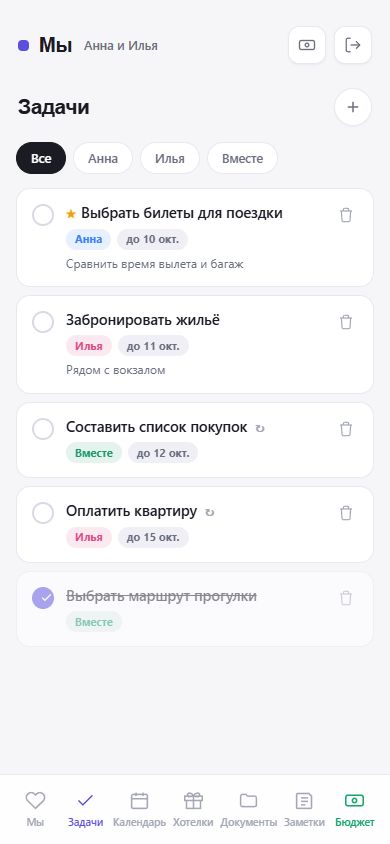
What to try in the first five minutes
Create “Buy groceries” and assign it to someone. Add a short list in the note and set a due date. Your partner will see the saved task when connected to the internet.
Add a meeting or dinner separately as a calendar event, so you can see what to do and when to be there.
Task and calendar examplesStill need help?
Describe what you did and what happened. Hide personal information and invitation codes in screenshots.
Send an email